Table of Contents
Differences between key-value and object stores
The line between object stores and key-value stores tends to blur, often making key-value stores get happily lumped in as object stores. It's like the classic 'are they the same or just close cousins?' situation.
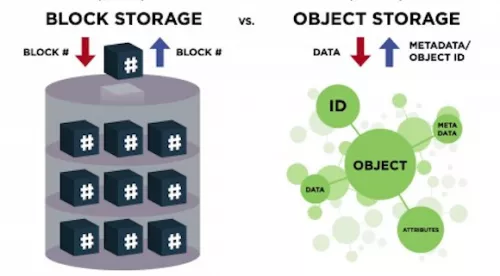
In a key-value store, data is tracked by a key, not by some low-level block number. The key can be just about anything - "cat", "olive", "42" or even a random string of bytes of any length. The data itself, known here as the value, can also be any size and consist of any byte sequence. You store data by handing over a key and its associated value, and later fetch it again just by using the key. Think dictionaries in Python, hashes in Perl, or maps in Java, Rust, and C++. Popular data stores like Memcached, Redis, and CouchDB also play nicely as key-value stores.
Object stores share a couple of traits with key-value stores. For one, the identifier or URL-basically the key substitute-can be any string you fancy. Second, they handle data of virtually any size without batting an eye.
But here’s where object stores pull ahead. They let you tag data with a handful of attributes or metadata, turning the bundle of key, value, and attributes into a proper "object." Think of it as not just knowing the "what" but also the "who," "when," and "how." While key-value stores expect values to stay relatively tiny, typically in kilobytes, object stores are the heavyweight champs, comfortably juggling files hundreds of megabytes or even gigabytes in size. Finally, object stores usually settle for eventual consistency - data might take a while to sync everywhere. Key-value stores, meanwhile, tend to guarantee strong consistency right off the bat.
Why object storage matters for your business
As your business grows, so does your data - often in unpredictable ways. You end up juggling numerous isolated data pools, each coming from different sources, feeding a variety of applications and users. The catch? Most of that data is unstructured, scattered across different formats and storage media, refusing to fit neatly into a single, central repository.
This chaos creates headaches. It slows innovation to a crawl because your data isn’t easily accessible for analysis, machine learning, or building new cloud-native applications. That’s where Rabata’s object storage steps in. It breaks down those data silos, offering a massively scalable, cost-effective way to store any type of data exactly as it is. No need to reformat or wrestle with capacity limits.
Traditional storage systems struggle with complexity, limited capacity, and high costs. Rabata’s object storage throws those concerns out the window by delivering practically unlimited scalability at impressively low prices per gigabyte. Your data grows, your costs don’t spiral - sounds like a dream, but it’s real.
Managing your unstructured data becomes a breeze thanks to Rabata’s user-friendly interface. Apply smart policies to keep your storage costs optimized, automatically switching storage tiers when the time’s right. Instead of hunting through scattered folders, you get instant access to your data, making analysis smoother and insights quicker - so decisions happen faster and smarter.
Sure, you can keep objects on-premises if you want. But Rabata’s object storage is built for the cloud from the ground up, offering near-limitless scalability, rock-solid durability, and cost-effectiveness all in one package. Need to access your data on the fly, from anywhere in the world? No problem. With Rabata, your data is always within reach.
The benefits of object storage
Scalability is where object storage truly shines. Imagine a storage system that grows as fast as your business needs it to, without limits. With Rabata's object storage, each piece of data is stored as an individual object in a flat, simple environment. Need more space or processing power? Just add more servers to your storage cluster. It’s like building blocks - the more you add, the bigger and faster it gets. Perfect for handling large files like videos and images without breaking a sweat.
Forget about the messy web of folders and directories. Object storage simplifies everything by removing the clutter and complexity of traditional hierarchical file systems. Rabata's solution delivers faster data retrieval since there is no need to dig through layers of folders. This means no more wasted time waiting for the system to find your files - just quick and efficient access, even when dealing with massive amounts of data.
Worried about losing data if a drive crashes or a server goes down? Rabata’s object storage has you covered. Data is automatically replicated across multiple nodes or clusters, so if one piece of hardware fails, the system keeps humming without losing a byte. This replication can happen right inside your data center or stretch across the globe, giving you top-notch availability and peace of mind with disaster recovery built in.
Each object stored is like a mini-library, packed with metadata - detailed info about the data itself. This metadata is a game changer because it makes searching for specific files way easier and more precise. Rabata allows you to customize these data tags to fit your business needs, opening doors to smarter filtering, advanced analytics, and useful insights that help you understand market trends and customer behavior better.
When it comes to cost, Rabata’s object storage ticks all the boxes. Offering pay-as-you-go pricing means you only pay for what you actually use - no big upfront investments or waste. Prices depend on storage volume, data retrieval, bandwidth, and API calls. Plus, Rabata supports tiered pricing with different storage classes so you can save money by moving rarely accessed data to cheaper tiers. Many object storage solutions run on everyday, vendor-neutral hardware, so you can repurpose existing infrastructure, keeping your budget happy without sacrificing quality.
Security is serious business, and Rabata delivers. Your data is protected with strong encryption both at rest and during transfer. Access control is razor-sharp thanks to Identity and Access Management (IAM) policies. Need extra protection? Features like multifactor authentication, data loss prevention, and integration with your existing enterprise security tools mean you’re covered on all fronts. Centralized monitoring and threat detection help catch issues before they become problems.
Object storage fits naturally into cloud ecosystems, supporting multitenant storage as a service. This means multiple teams or companies can use the same storage system without stepping on each other’s toes. Rabata helps reduce your on-premises IT burden by offering affordable cloud storage options that keep your data accessible anytime, anywhere. It’s ideal for collecting vast amounts of unstructured data from sources like Internet of Things devices or mobile apps powering your smart devices.
Transition to consolidated form
When configuring storage, especially for specific object types, things can get tangled fast. Each object type - think CI/CD artifacts, LFS files, or upload attachments - ends up needing its own object storage setup. That means separate passwords, distinct endpoint URLs, and basically repeating yourself over and over again.
- Object storage configuration is independent for each object type like CI/CD artifacts, LFS files, and upload attachments.
- Connection parameters such as passwords and endpoint URLs are duplicated for each type, adding clutter.
Picture a Linux package installation where you have to juggle multiple storage configs just to keep things running smoothly. Sure, having the option to spread your data across different cloud providers sounds great on paper. But in reality, it’s like carrying several bunches of keys when you only need one-it adds complexity and clutter without much benefit.
Here’s where Rabata’s protected cloud storage shines. Since GitLab Rails and Workhorse components both need access to the object storage, the consolidated form cuts out the noise by sharing connection details instead of duplicating them. This keeps credentials neat and tidy, avoiding a messy sprawl of repetitive settings.
It’s important to note that the consolidated setup kicks in only if you drop all the individual configurations from the original form-like artifact stores or upload connections. Simply remove those original lines, and Rabata’s system switches gears seamlessly to the streamlined, consolidated form.
Full example using the consolidated form and Amazon S3
Let’s dive into configuring AWS S3 as your go-to object storage across all supported services. The magic happens in the /etc/gitlab/gitlab.rb file, where you tell GitLab to enable object storage and connect it to AWS with your custom settings. This means swapping in your AWS region, access keys, and optionally, encryption details if you want your data guarded like Fort Knox.
For those keen on server-side encryption, there’s a sprinkle of optional parameters to add, handling everything from AES256 encryption to using AWS KMS keys. Each artifact type, from uploads and packages to Terraform state and CI secure files, gets its own dedicated S3 bucket, all named conveniently for easy recognition.
Now, here’s a pro tip: if you’re using AWS IAM profiles (because managing keys manually is so 2010), ditch the access key and secret key lines entirely. Just flag 'use_iam_profile' as true, and watch GitLab handle authentication smoothly without you lifting a finger.
- Edit /etc/gitlab/gitlab.rb - add your AWS connection and bucket settings.
- Run sudo gitlab-ctl reconfigure to apply changes and breathe life into your setup.
- Create Kubernetes Secrets with your object_storage.yaml if operating inside Kubernetes; it’s like giving your cluster a VIP pass to AWS.
- Export and tweak Helm values to keep your GitLab Helm chart in sync with your object storage settings.
- Finally, upgrade your Helm release with the new configuration to bring all changes live.
When working with docker-compose setups, it’s equally straightforward. Tweak the docker-compose.yml file’s environment section with the same consolidated object storage configs. Remember our friend 'use_iam_profile'? Same rule applies here if you don’t want to hassle with keys.
Once the docker-compose.yml is saved, just fire up docker compose up -d, and your GitLab container will start humming with S3 storage support baked right in.
Looking to go old school? The configuration can also be done by editing /home/git/gitlab/config/gitlab.yml and /home/git/gitlab-workhorse/config.toml directly. It’s a bit more hands-on but gives you great control, suitable for those who prefer tweaking config files by hand. Again, drop the key pairs if IAM profiles handle the permissions.
After adjusting these files, a quick restart using systemctl or service commands will get GitLab running with its new object storage powers.
Vultr Object Storage
Storage you can count on, no matter the task. Whether you're backing up cat videos or critical business data, Vultr Object Storage has a performance tier to match your needs. Want to know how much it costs? Just pick your tier, and you'll see the price clearly.
- 1 TB of Storage included
- 1 TB of Bandwidth included
Need more space? No problem. Each extra terabyte of storage will set you back just \. And if your data loves to travel, every additional terabyte transferred costs only \. Simple, fair, and transparent pricing from Rabata’s trusted cloud storage.